

The ROG Rapture GT6 would make the most interesting hardware in Asus’s ZenWifi canned mesh family, except it’s not a ZenWifi.
Instead, Asus touted it as “the first ROG mesh WiFi system optimized for gamers” at the initial product announcement on Aug 23, 2022.
But you can consider it a marriage between the company’s ZenWifi approach and its standalone gaming routers to be the first gaming canned mesh system. It probably won’t be the last.
Here’s the bottom line: If you’re in the market for a reliable Wi-Fi 6 mesh system that happens to have all of Asus’s gaming features built-in, at the current street price of around $600, the Asus ROG Rapture GT6 can be an excellent fit even with its current relatively buggy firmware.
The GT6 is not a must-have nor include anything earth-shattering you haven’t seen in existing Asus Wi-Fi broadcasters. But it sure is a welcome option among purpose-built home mesh systems of the outgoing Wi-Fi 6 standard.
Dong’s note: I first published this post on August 23, 2022, as a news piece when the GT6 was launched and updated it to an in-depth review on February 17, 2023, through hands-on testing.

Asus GT6: A new class of mixed ROG Rapture hardware
At the core of it, the Asus GT6 is a 2-pack purpose-built mesh system, just like any ZenWifi set. It includes two identical mesh routers.
Pick one and set it up as the primary router, and the other will automatically work as the satellite unit — the hardware is pre-synced, and each is a member of Asus’s AiMesh ecosystem.
Or you can use each as the standalone router of a home where a single broadcaster is sufficient. In short, it’s familiar hardware as part of what I detailed in this post on Asus Wi-Fi broadcasters.
The biggest difference is that the GT6 is Asus’s first Wi-Fi 6 canned mesh hardware with built-in support for the company’s long list of gaming features, as the latest member of the company’s gaming elites.
So, in more ways than one, it’s an alternative to getting one of Asus’s AiMesh-enabled gaming routers, such as the GT-AX11000 Pro, and using another AiMesh router as the satellite.
Asus Wi-Fi 6 and Wi-Fi 6E gaming routers
The table below shows the Asus gaming routers that support Wi-Fi 6 or Wi-Fi 6E. Follow the links to read more about each.
Follow the link of each model name for more — street prices are subject to change.
The post on Asus Wi-Fi broadcasters explains in detail the meaning of each gaming feature mentioned in the table.
Or you can also think of it as the ZenWifi Pro XT12 with built-in gaming features. By the way, despite having a similar shape to the ZenWifi XT8, the GT6 is closer to the XT12 in terms of hardware prowess.
With that, let’s check the tech of these three.


Hardware specifications: Asus GT6 vs ZenWifi Pro XT12 vs ZenWifi XT8
A sort of new design
It’s worth noting that you can play online games with any Asus router and any ZenWifi mesh. All of them feature a robust QoS feature. Most of the time, that’s all you need.
That said, the GT6’s explicit support for games is more convenient than a necessity for gamers — you can pick a game and then apply the best settings with one click.
But, as a gaming machine, the GT6 has more than just software features. It looks the part, too.
Indeed, the new mesh hardware features Asus’s eye-catching ROG Rapture theme.
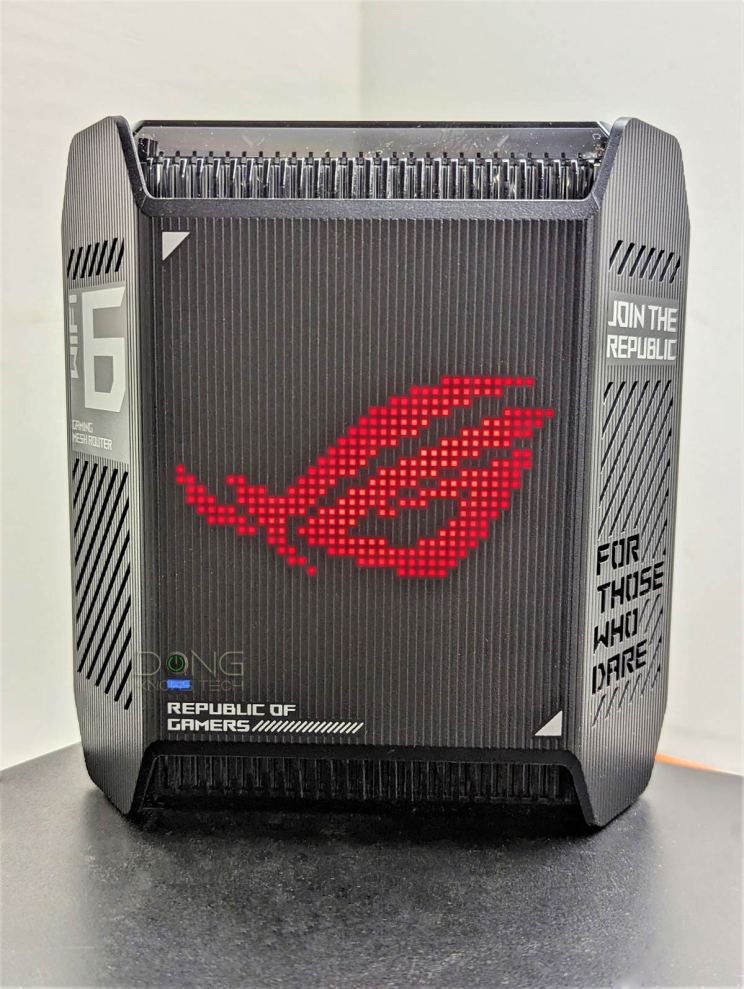
On the front, it carries a large ROG RBG programmable color- and pattern-changing light similar to the GT-AX1100 Pro. This light is synced between the router and satellite units, but you can also turn it off on each.
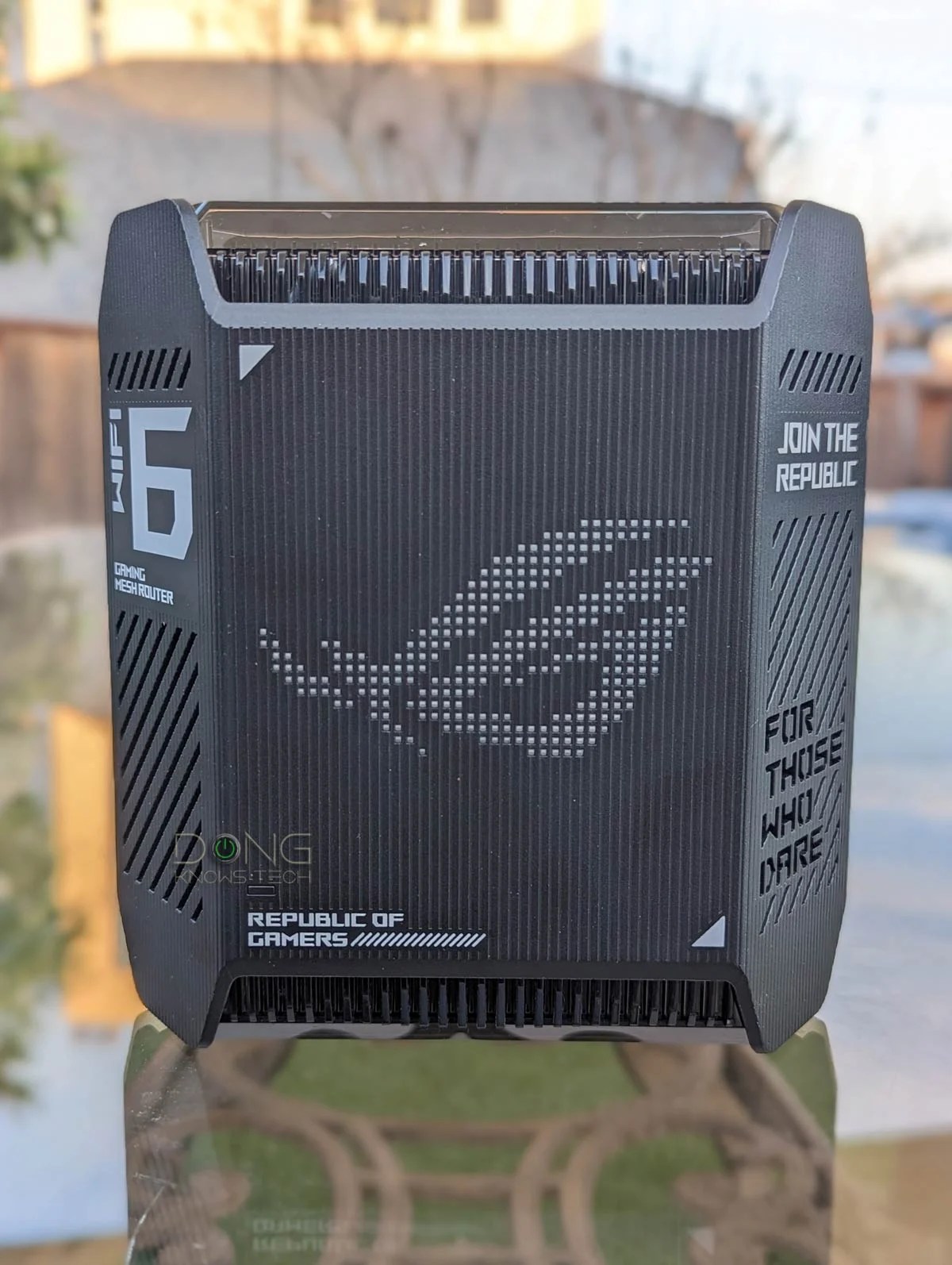
The Asus GT6’s top is transparent, like the case of the XT12, but in this case, that only allows you to see the antennas and other internal parts — there’s no decoration lighting.
Still, it’s safe to say this is the first canned mesh system with a design and features to arouse gamers. It’s a legit gaming system — however you define “legit”.
The GT6 has a cool trick as a mesh system: the support for UNII-4.
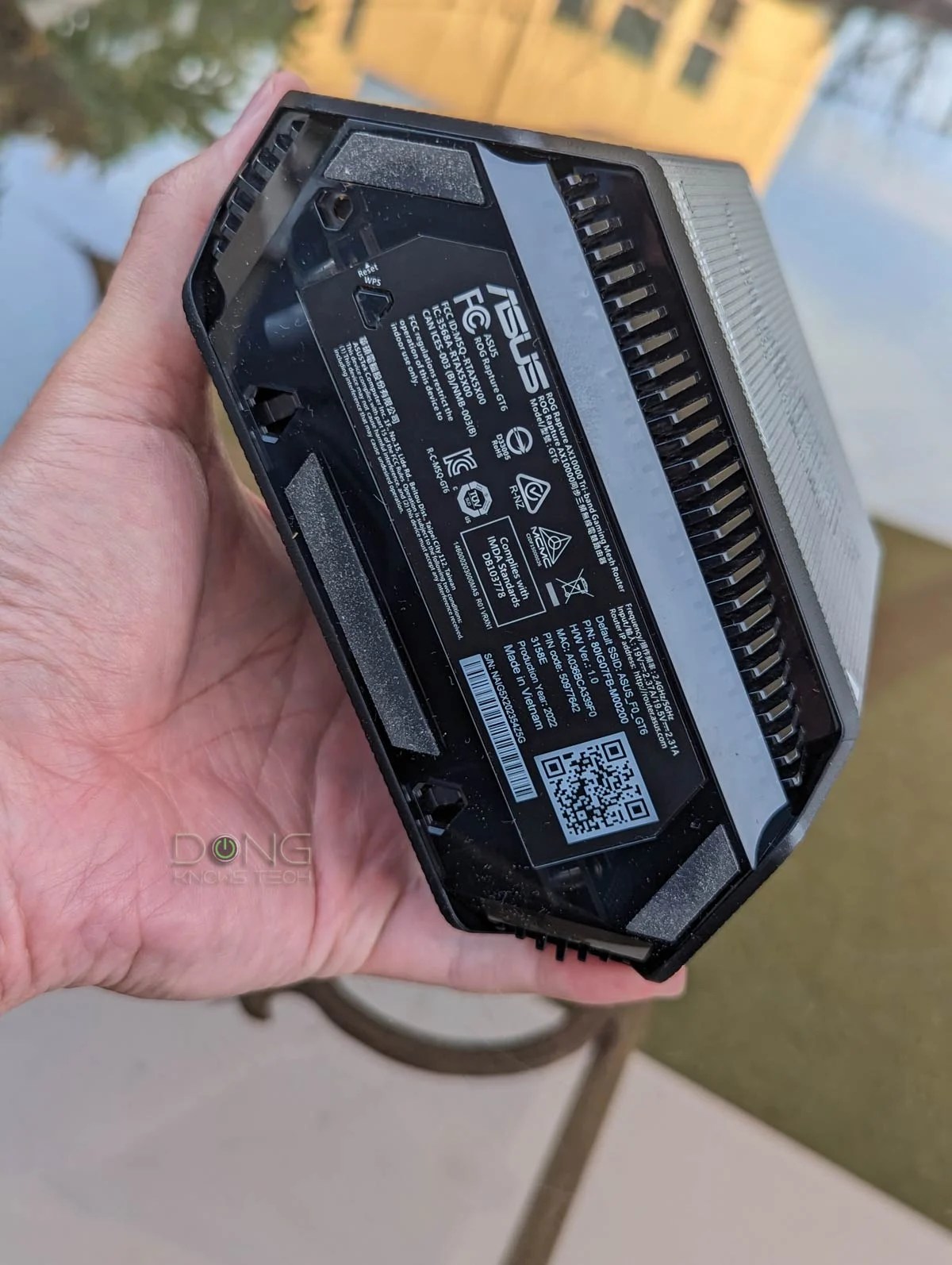
Asus ROG Rapture GT6: Detail photos




UNII-4: A boon for those unable to run network cables
UNII-4, also known as the 5.9GHz band or the final frontier of Wi-Fi 6, is the newly available portion of the 5GHz band and enables the availability of a third and only DFS-free 160MHz channel which works excellently as the backhaul in a fully wireless mesh system.
UNII-4: What 5.9GHz band is, and why it’s hot
The GT6 is not Asus’s first UNII-4 supporting hardware. The company has recently enabled this on the ZenWiFi XT8 via firmware, and its upcoming ZenWiFi Pro XT12 and GT-AX11000 Pro also have it.
The list: Current Wi-Fi 6 solutions that support UNII-4
However, the GT6 is the first gaming canned mesh that features the 5.9GHz portion of the frequency band.

When it comes to gaming, nothing beats network cables — you should get your home wired — but for homes that must use a fully wireless mesh, UNII-4 is the best wireless alternative.
Single 2.5Gbps port. Familiar features and settings
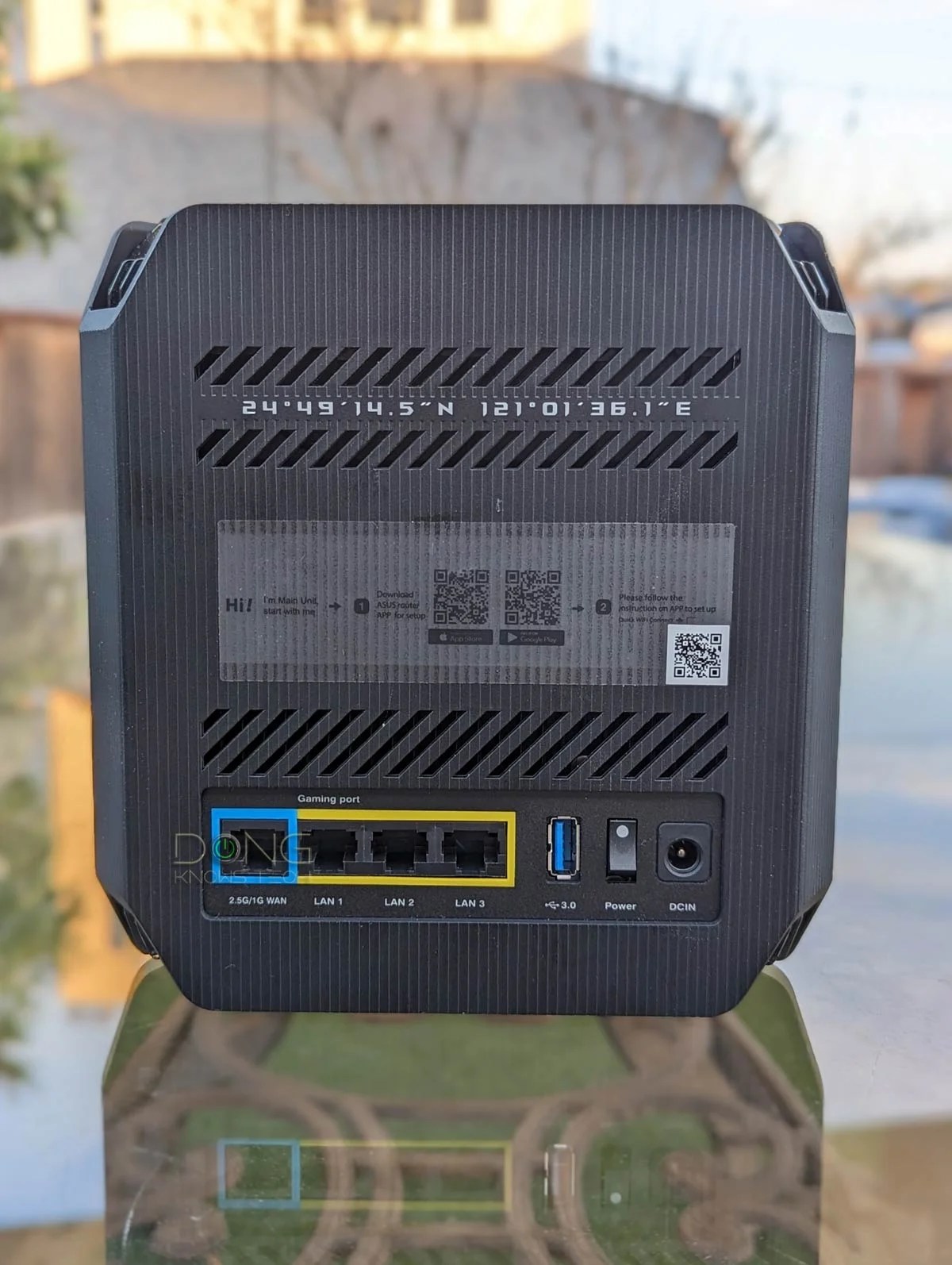
Besides that, each Asus GT6 router comes with a single 2.5Gbps Multi-Gig WAN-only port, and three Gigabit LAN ports, like the ZenWiFi XT8.
So it’s a bit tight on the network port department — by now, I’d hope that all new routers have at least two Multi-Gig ports, like the GT-AX6000 or ZenWiFi Pro case ET12.
To make up for it, it has a USB 3.2 Gen 1 port to host a good collection of USB-related features, including the ability to function as a mini NAS server.
Besides that, the ROG Rapture GT6 shares all the standard features and settings available in Asus gaming routers. I tried these out in my testing, and they all generally worked as intended.
The new mesh is so familiar that I’ll skip mentioning the long list of what it can do — which you can find out more about via the link below — and jump to its real-world performance. That’s where it gets interesting anyway.
Asus Wi-Fi hardware: All you need to know
Asus ROG Rapture GT6: Excellent performance despite buggy firmware
I tested the Asus GT6 for over a month and was generally happy. The reason I took my time was because of its firmware.
A bit of a firmware-related issue
Out of the box, the hardware comes with firmware ver. 3.0.0.4.388_20950, which is a pre-released version. I used it for over a week with no issues at all.
General note on Asuswrt firmware
Asus regularly releases firmware updates, a Linux-based operating system called Asuswrt, for its routers. Some updates might inadvertently cause a particular model to go haywire, likely because the company tries to do so much with its routers.
As a result, when it comes to updating firmware in Asus routers — especially in an AiMesh system of mixed hardware units — keep the following three items:
- Avoid the initial major release: This is the first firmware version of a model where the 3xx number change, such as from 384 to 386 or from 386 to 388, etc.
- Avoid using Auto-Update for firmware: You should update the firmware when you see fit instead of letting the hardware update itself.
- Version consistency (in a mesh system): Generally, it would be best to use the firmware version of the same major release (*) for all AiMesh members.

On the one hand, moving between major releases might break your AiMesh setup or even your standalone router. On the other, new hardware comes with a specific initial version out of the box — you have no option to downgrade it — and some old models won’t get the latest release. So depending on the mesh combo, your luck will vary.
As a rule, in a mesh system, it’s best to wait for a few minor updates of a major release before upgrading. Depending on the hardware combo, you might need to rebuild the system from scratch or reset and re-add a satellite node if you change the major firmware version (in one or all hardware units involved.)
This version is not available for download, so there’s no way to go back to it, which explains why I used it for so long before upgrading.


However, upgrade I eventually did, as the hardware constantly nagged me about version 3.0.0.4.388_22233, which is supposedly the official initial release. Unfortunately, it didn’t work as well as the older release.
Specifically, with this version, the mesh only worked well when I didn’t customize the Wi-Fi settings further than the SSIDs and password. Things would go haywire if I did any more than that, such as changing the channel width or assigning a particular channel to the 5GHz-2 band. Most noticeably, clients would stop connecting to the satellite unit.
If you get this mesh set now, keep its pre-loaded firmware until a version newer than 3.0.0.4.388_22233 is available.
It’s worth noting that the latest firmware worked fine in my testing when I used the UNII-4 portion for the router’s 5GHz-2 band. And that’s important since it’s probably the only customization you should do, anyway.
Fast Wi-Fi performance, excellent coverage
I tested the Asus GT6 multiple times. Its real-world throughput speeds didn’t change between the two firmware versions, but the 2.5Gbps did play a role.
Per my standard testing, I generally hook the test server via a network cable to the router’s LAN port. In this case, the GT6’s Gigabit port limits its Wi-Fi performance.


(👉) Standard test with data hosted by one of the router’s Gigabit port
(★) Extra test using 2.5Gbps port to host test file
To take advantage of the 2.5Gbps port, which only works as a WAN port, I set up a double-NAT to host the test server via this port, and it made noticeable improvements, but only in certain situations.
Specifically, as a single router or satellite via Multi-Gig wired backhauling, the GT6 delivers much better performance when this port is used. But for the most part, its performance was on par with other Asus mesh hardware of similar specs, as you can note on the charts.

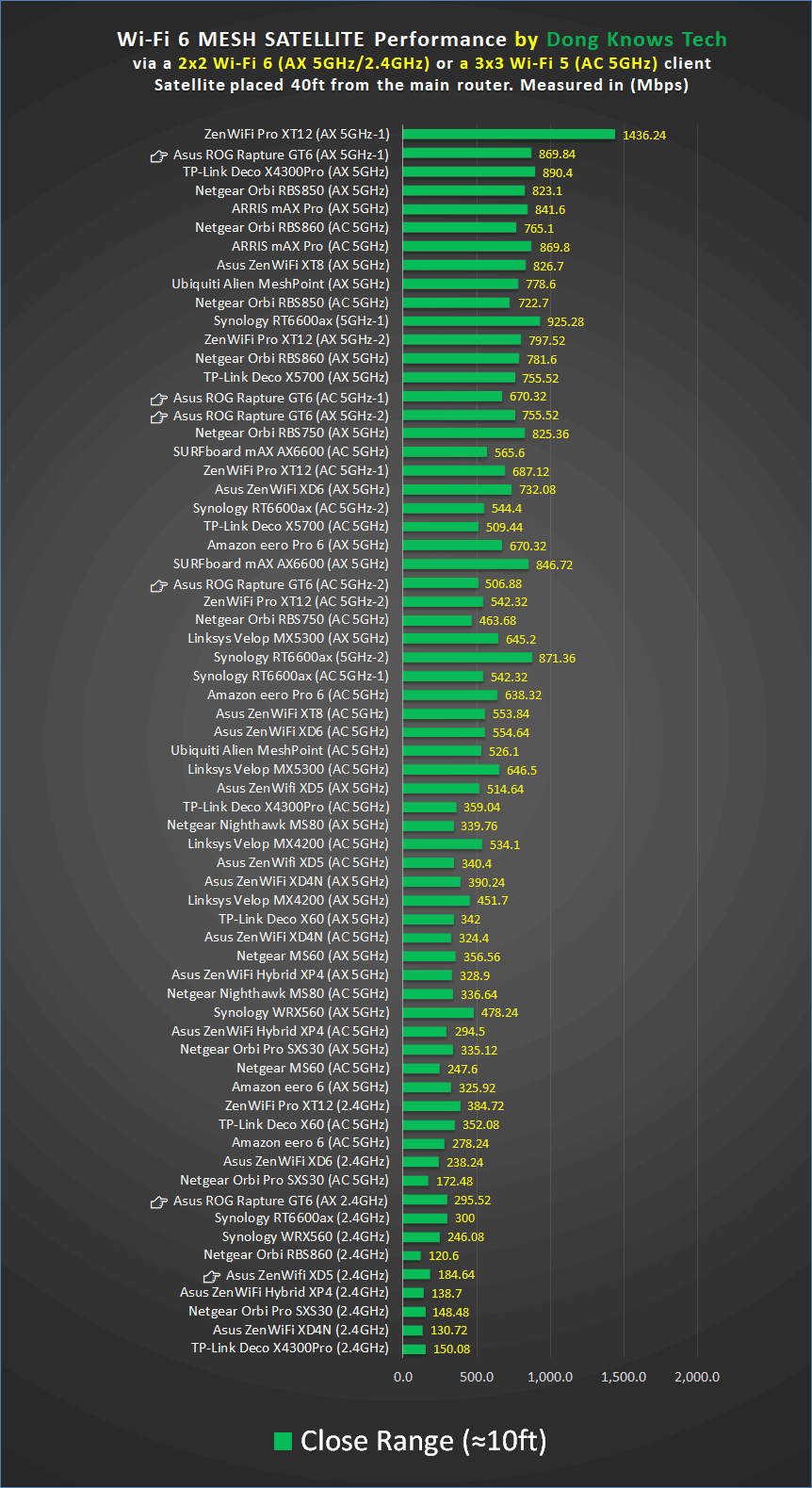
As for coverage, the Asus GT6 delivered about the same Wi-Fi range as the XT12. Generally, each unit can handle some 2000 ft2 (186 m2) when placed at the center. Your mileage will vary.
The 2-pack system also proved reliable, passing my multiple-day stress test without any issue, as long as I used it with the default Wi-Fi settings, as mentioned above.
An OK mini NAS server
The Asus GT6 didn’t impress when hosting a portable storage device via its USB port.
I tried a couple of top-tier portable SSDs with it, and while it worked fine, the sustained copy speeds were relatively modest — they were consistently well below the 100MB/s mark.
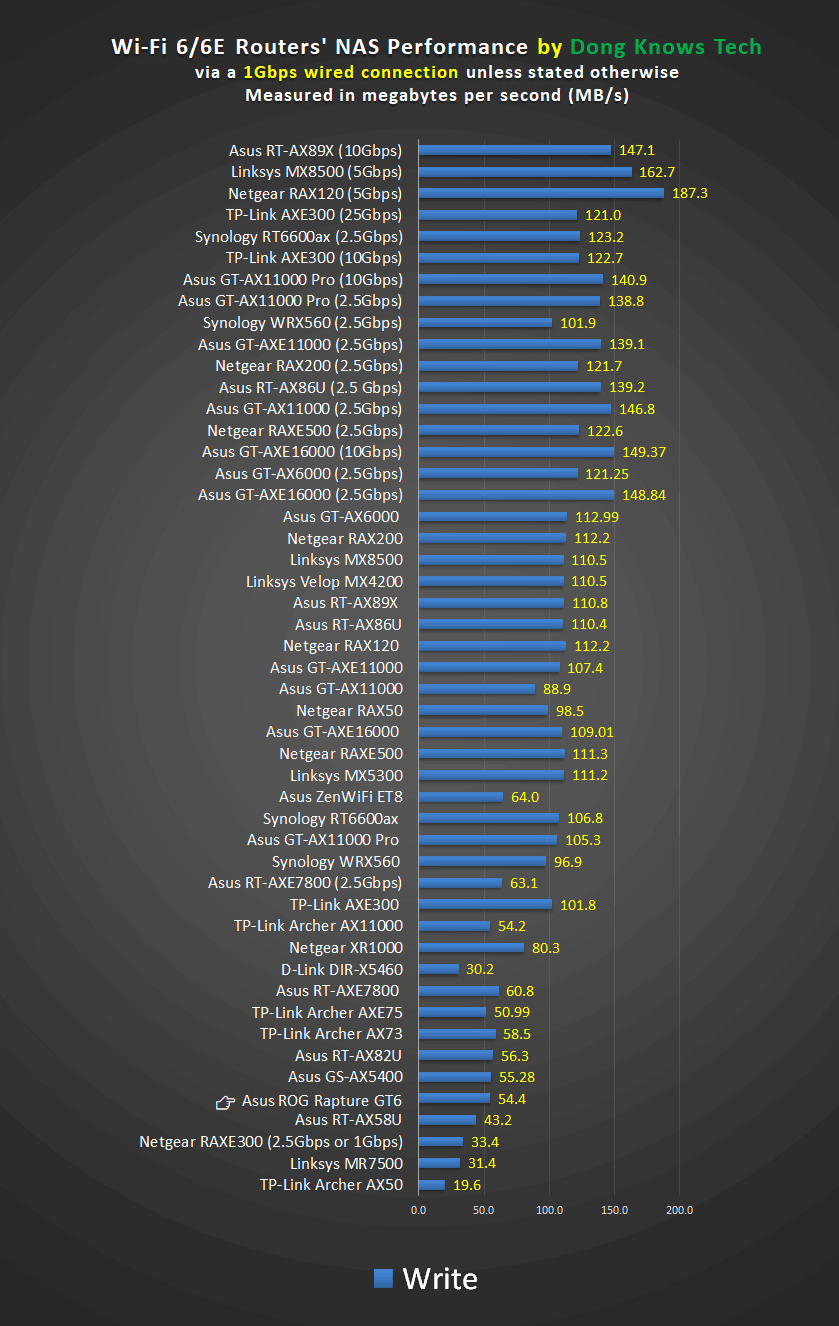
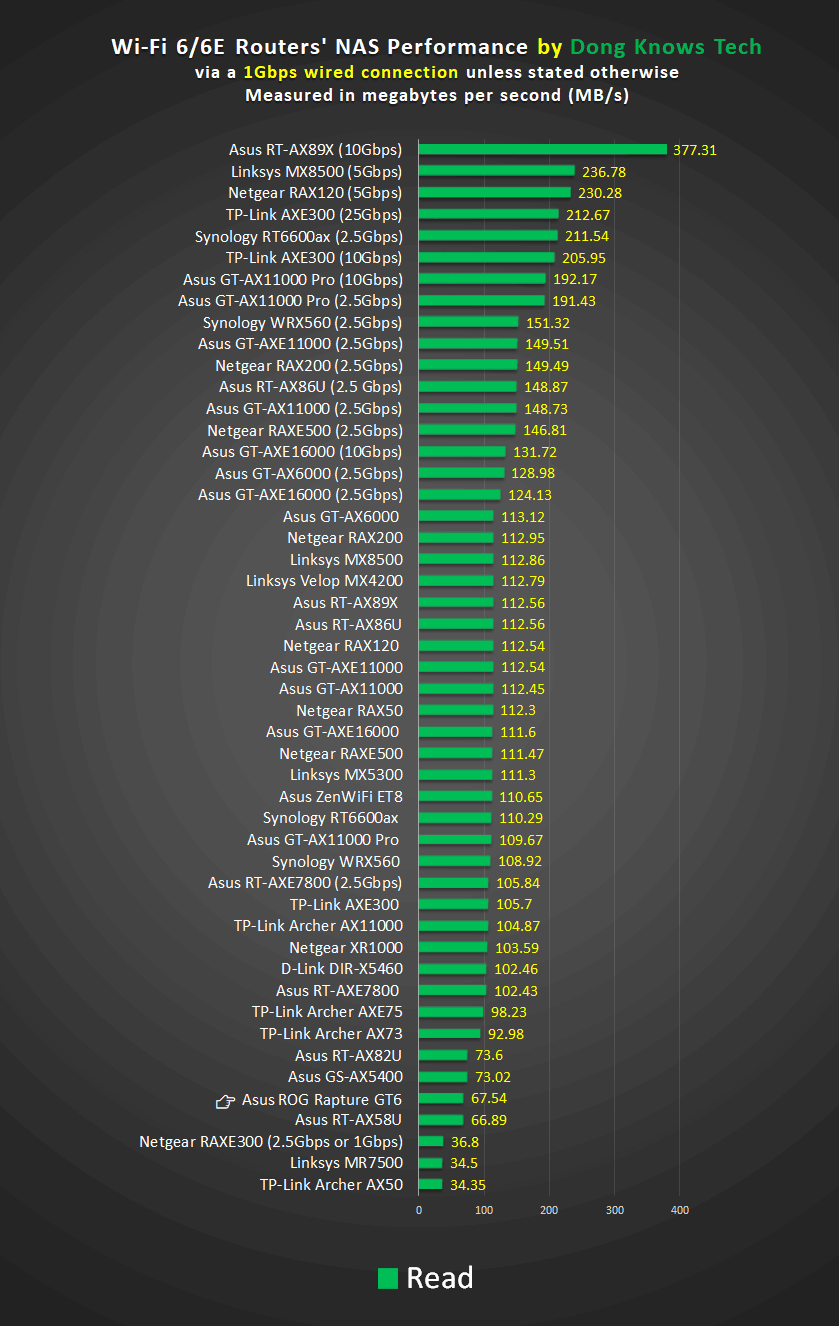
At this rate, the router can work as a server for mild network file sharing and media streaming needs. You should get a real NAS server or pick one of these routers if you’re serious about network storage.
Pros
Excellent Wi-Fi performance and coverage, UNII-4 support
Tons of useful features and settings, including built-in gaming features
AiMesh 2.0 full support, helpful mobile app, no login account required
Compact and good looking, USB port
Cons
Single 2.5Gbps WAN-only port
Buggy (initial release) firmware
Slow network storage performance when hosting a USB portable drive; not wall-mountable
Conclusion
The Asus ROG Rapture GT6 is not a must-have Wi-Fi system. You can get an Asus standalone gaming router and build it up into a mesh by adding more hardware.
However, compared to its ZenWifi cousin, including the XT12, this new hardware is a convenient way to get the Wi-Fi performance and the gaming features you need in a single package. And its lower price tag doesn’t hurt.
In any case, make sure you note the firmware issue above, and it’s a good idea to wait till a new firmware release is available before getting it.


